


FireFox and Chrome users have Google as a default search engine, Now Bing a killer attempt on Google search engine is also giving great results with high indexing an speed especially the UI(User interface) is very attractive as usual. So, if you are interested to make Bing as default search engine in Firefox or Chrome then follow the below steps.
FireFox users:
You can do this by installing a small Firefox addon Bing 20090531, add this addon to firefox and you are done.
Chrome users:
Open Chrome and goto Settings > Options. Now navigate to Basics > Default search and click manage button. In the new window click add button and enter: Name - Bing, Keyword - Bing, URL - http://www.bing.com/search?q=%s Then click OK and set Bing as default search engine.
Common lets welcome the bing world and be as a binger ;)
If you enjoyed this post, make sure you subscribe to my RSS feed!


Firefox is one of the best browser which became popular through its add-ons, technical support, updates and fixes.Most of the people who are aware of firefox and its features will never look back for another browser but some people like to use firefox for its fastness in browsing but likes the look and feel of IE.So have you ever thought of transforming Firefox to IE??? Yeah! You can. This is theme is supported from FireFox 3.0 – 3.6a1pre Download Internet Explorer 8 Theme for Firefox
Ie8fox 1.5 is a popular add-on which transform the look and feel of IE 8.0 to firefox.
If you enjoyed this post, make sure you subscribe to my RSS feed!
Do you know we can open multiple websites or homepages at start of FireFox? This mean when you start FireFox, it will open multiple sites eg: Yahoo, Google, AOL etc as set by you. Most of us use default firefox settings,m When you start FireFox, homepage of ONE website opens up . If you set your startup page as yahoo then yahoo.com will open up when ever you start your firefox browser.
Here is the simple procedure to configure this :
* Open FireFox Browser.
* Click on ‘Tools’ option in menu bar.
* Then click on ‘Options’ button there.
* Look for ’startup’, under main tab.
* Set ‘When FireFox Starts’ to ‘Show my homepage’ in drop down box .
* Type the website address/URL in ‘Homepage’ box seperated by | symbol.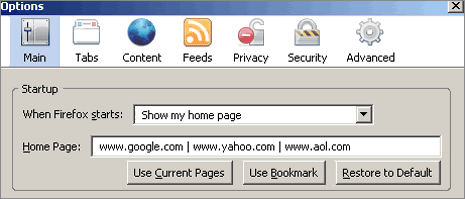
For example: if you want to open Google, Yahoo and AOL at the same time, then type - www.google.com | www.yahoo.com | www.aol.com


